Showing posts with label Linux. Show all posts

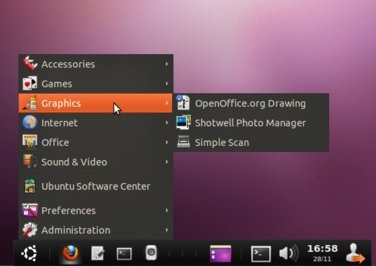
List of Best Applications for Ubuntu

In this article, we covered the best free applications for Ubuntu. To get the application of your preference, you can simply click the link you want to download and then save it directly to your computer. It's time to navigate through these useful applications and choose the best suit your needs.

List of Best Applications for Ubuntu

All these applications are compatible with operating systems Ubuntu 11.04 Natty Narwhal, Ubuntu 11.10 oneiric Ocelot and Ubuntu 12.04 Precise Pangolin.

List of Best Applications for Ubuntu

  1. Desktop Flickr Organizer: Application to manage online Flickr album.
  2. PDF Mod: Application to edit documents in PDF format.
  3. AcetoneISO: Extract, convert, capture, encode and decode DVD and CD images on Ubuntu.
  4. Firestarter: Firewall to protect Linux computers.
  5. News-RSS Ticker: Feed ticker that brings the latest news on your desktop Linux.
  6. One Ubuntu : Cloud storage service for Linux and other platforms.
  7. GiverThe application you easily transfer files in a Linux network.
  8. KTorrent: Lightweight BitTorrent client with advanced configuration options.
  9. Nanny Parental Control: Application of parental control, with time restrictions to limit Internet use for children.
  10. Deja Dup Backup: Application for backing up and restoring data in Ubuntu.
  11. Steadyflow: Minimalist download manager for Ubuntu.
  12. Comix: Comics reader compatible with CBZ, ZIP, RAR, TAR, JPG, PNG, GIF, TIF, BMP, ICO, XBM and other formats.
  13. Liferea: RSS feed reader for Ubuntu.
  14. Gnome Activity Journal: Keep a log of all activities, open files and folders in Ubuntu.
  15. Starry Hope Uploader: Application to upload photos to Facebook on Ubuntu.
  16. Hardware Lister: Application for listing of hardware configurations.
  17. Super Boot Manager: Plymouth boot manager, Burg and Grub.
  18. Boot Repair: Application to troubleshoot boot Ubuntu.
  19. Cryptkeeper: Tool to encrypt folders in Ubuntu.
  20. Synapse: Application to quickly find applications, documents, videos, images, etc..
  21. DesktopNova: Wallpaper Rotator for Ubuntu.
  22. gm-notify: Gmail Notifier email.
  23. LightDM Manager: Change the start screen in Ubuntu.
  24. Radio Tray: Radio Player Internet minimalist Ubuntu.
Read more...

Setting VPN on Ubuntu

To hide your online identity you can use a virtual private network. Some companies and schools require the use of a VPN (Virtual Private Network) to connect to your network from an external server. Operating System Ubuntu Linux can configure a VPN and access it whenever you want. You can also configure the system to automatically connect to the VPN.

How to configure VPN on Ubuntu

Step 1. Click on the icon "Network" (Red) in Ubuntu toolbar.

Step 2. Move the cursor over "VPN Connections" and click on"Configure VPN.

Step 3. Click "Add and "Create"

Step 4. Enter the VPN gateway. Enter your username and password if required VPN.

Step 5. To automatically connect to the VPN, check the box next to "Connect Automatically".

Step 6. Click "Save" , then click"Close to exit the configuration window.

Step 7. Finally, click on the icon "Network And select the VPN from the menu to access it.

Read more...

Blogilo, blogging client for Linux

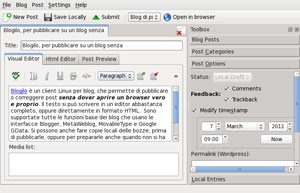
Blogilo is the kind of programs that Linux users who have a blog with many forward looking. Usually is seen on the Internet the question: "Is there a program that is similar to Windows Live Writer?. " The answer is always the same .... NO.

What do exist are free programs for Linux that are useful for writing blogs. Including one of the most complete is called Blogilo.

blogilo

At a time Blogilo was known mo Bilbo, But in recent versions has been updated a lot and has many more features. One of the functions that may be interested in is Blogilo that lets you check the spelling. If you have installed OpenOffice or LibreOffice in your Linux distribution, then Blogilo use these dictionaries to check spelling.

Blogilo also has ability to insert images and videos, add links, specify tags (labels), and many more will discover to your work. Download Blogilo

Read more...

Network protocol analyzer Wireshark 1.4.4

Something is wrong with your network and do not know why? Wireshark can help. This is a protocol analyzer network known by anyone who has made experiences with management and / or network analysis. With this tool, Whose version 1.4.4 was announced this week, we can obtain real-time, detailed information packet data of our network, can be displayed by various types (IPX, ICMP, TCP, UDP, etc), very useful especially when dealing with large Network terminal.

It also has an official website with enough information to help the uninitiated. Here you can find a video that shows the power of wireshark. Wireshark is in the repositories of many distributions. If it is not your case, you can proceed to download it here.

Read more...

Ubuntu Tweak, customize Ubuntu to detail

Ubuntu Tweak is an application for most popular Linux distribution : Ubuntu.

Ubuntu Tweak offer a tool to customize all the functions and areas of Ubuntu Linux. It also allows us to download files (packages) without having to write anything on the console.

Windows users coming to Linux first, usually begin using Ubuntu, A distribution extremely easy to use. But there is a problem, Linux is not Windows.

 img

To understand why Ubuntu Tweak is so important and practical, you have to keep in mind that a Windows user is accustomed toinstall a program wiht click on "Next" and "OK." When it comes to Linux, because sometimes (fortunately more and less) have to type commands at the console of Linux to install or uninstall programs.

Ubuntu Tweak does all the dirty work (install - remove - customize Linux) from a visual, easy to use. Download Ubuntu Tweak

Read more...

New version for Linux Songbird

Good news for users who are approaching the Free Linux distributions. Now the powerful Music Player based on XULRunner, Songbird, Will be back on our computer and functions are still as powerful and entertaining.

The new version 1.9.3 is much faster and has better performance, open the program it took much less than on previous occasions and that is reflected also in a much more fluid navigation through the program interface.

Another point in favor of new version of Songbird installer is not required. Directly have to download the tar.gz file from the official website, unzip and start from the songbird.bin.

One of the best surprises I take the test new version of Songbird in Linux, which until a few months ago had failed to receive official updates, was how quickly load your music library.

Our favorite tracks on the screen within seconds and from that moment we can begin to play and listen to our favorite music. Got a number of sound features For best results and your favorite songs are heard in the best shape.

Read more...

Linux Mint 9 LXDE: Light distribution for low-income teams

Among the many things we have to speak at Computer Blog, we can say that our free software consented and operating system (Linux) is a matter that we sometimes forget to tell the truth, but we have always in our thoughts. On this occasion I will comment on Linux Mint 9 LXDE, An interesting Linux distribution for very rapid.

Linux Mint 9 LXDE, Is a Linux distribution that has guided its target computers that have few resources, so it follows that is quite fast. In addition to that we mention that this distribution allows the user to fully customize the system, the procedure is very simple. You can set the system behavior for all.

This Linux distribution is based on Debian, so you can understand what their power, and as with any project open source In Linux Mint 9 LXDE There is also an active community that is constantly participating in and contributing ideas. By the way, they ensure that if an idea is beneficial to all, could deploy faster than you think.

Basic characteristics could tell, that has a cluster number of applications for all the activities you can imagine such as a web browser (Firefox), Instant messaging (Pidgin). A screenshot of the application list system:

As you can tell there in the screenshots above, Linux Mint 9 LXDE no problems with network connections, or Internet, Video drivers, among others. I tested this distribution on a virtual machine VirtualBox and left me happy. The design (or 'interface') system is very clean, I see minimal, as for a netbook.

In short, Linux Mint 9 LXDE is a distribution of Linux that we should try above all if we kept old equipment (holding powder) for this large-scale distribution highlights precisely because of its great use of resources, and his eloquent quickly. Link

Read more...

Recover Data for Linux, recover Linux data files

Recover Data for Linux is software that must be provided "just in case." Can be defined Recover Data for Linux as a tool that is extremely useful for recover all types of files Linux operating systemUnder any of the more popular distributions.

True, true, we all know ... Linux is an operating system that has great stability, but nothing is perfect in this world, and less in the digital world  .So it's always good to have in our "toolbox" with Recover Data for Linux.

recover-linux

Recover Data for Linux you can recover files damaged by unexpected system shutdowns, never lacking power outages, or damaged by virus, yes ... there are viruses for Linux too, and even allows us to recover files that have been corrupted by reason of any installation or removal.

Software Recover Data for Linux is a trial, therefore, should not install it until you really need, since it works perfect for 30 days.

Read more...

How to kill an application in Linux that does not close

Although there is the belief that Linux is not an operating system that is cherry, I regret to say that this is not quite true. If it happens occasionally that one or another application locks / cherry and apparently can not do anything. If you have used Windows know the famous "CTRL + ALT + DEL", something missed when we close a process that does not work, but How do we do this in Linux?

There are a couple of instructions that can be used in these cases. But there is another method that is more like what we do in Windows, something easy, especially for those who have recently migrated.

Go to System / Administration / System Monitor. We will go something like the window that appears in Windows when you press the famous combo of the three keys. If you go to the tab "processes", you'll see what is happening on your system. Find what's cherries, please click right on it and then kill process. That's it.

There is another way to do this through the console commands "kill " and "killall"But I think now with the ease you have to use Linux operating systems have a very friendly graphical environment, you do not get tangled life learning codes, which end up forgetting the time. This does not mean you have to be loose with this type of learning, but that's another story.

Read more...

How to login automatically in Ubuntu

If you've ever used Ubuntu know that to enter the system you should login with a username and password that were created when installing this OS. This process can sometimes be tiring, especially if you reboot the PC and let it do this alone and suddenly you realize you did not start because he was still on screen login. Or just do not need this process there is only one way to give security to your system.

If you want this not happen and Ubuntu is logged automatically, Go to System / Administration / Access screen.

A new window will be blocked. Press "unlock" and set your password. Then mark "Login as user-name automatically" and then close.

That's it. Very simple. If you want you can also tell you to stop the automatic login for a few seconds for someone to login, but if the single user are you (like me) is not necessary. This tutorial should work on any Ubuntu or other Linux have Gnome and environment But I did in Ubuntu 10.10.

Read more...

DockbarX the Windows 7 taskbar in GNOME

One of the best things about Linux is the number of alternatives there are for each aspect of the system. We can change from something as simple as menu launcher until the actual desktop system. Course, there are alternatives to taskbar And today we bring you quite interesting: DockbarX.

DockbarX

DockbarX is a toolbar with look and feel of the Windows 7 superbar: Previews of windows, icons bars instead of text, grouping of tasks and programs anchor. In addition, it also brings issues, integration with Compiz effects and even allows you to configure mouse shortcuts to close windows, maximize, minimize, and more with just a mouse click.

To install on Ubuntu, run sudo apt-add-ppa repository: dockbar-main/ppa & & sudo aptitude update & & sudo aptitude install dockbarx dockbarx-themes-extra and after the panel aƱadidlo GNOME that you please. Nothing works poorly And if you're used to Windows 7 DockbarX superbar I will be very comfortable.

Read more...

TouchPad-Indicator, turns the touchpad with a keyboard shortcut (Ubuntu)

Although touchpad is the best option for those who write faster, and does not require large movements such as those that are made to the mouse, there are times when we prefer to disable it. For example to write intensively, or when we will use the mouse to design images.

It is clear that all models of laptops and netbooks are a key to activate and deactivate the touchpad quickly, but this may stop working over time. If that happens, there is an excellent utility for Linux called Touchpad-Indicator, Which gives us the opportunity to do so using a keyboard shortcut.

This is a small utility developed by Lorenzo Carbonell, and we can add to Ubuntu as follows:

sudo apt-add-ppa repository: lorenzo-carbonell/atareao
sudo apt-get update
sudo apt-get install touchpad-indicator

Once installed TouchPad-Indicator, will find it in Applications -> Accessories -> Touchpad Indicator, and the coach will see the possibility of creating a keyboard shortcut to toggle the touchpad.

Link

Read more...

Listen to the Linux Kernel from his own radio station

Linux Radio is perhaps one of the most bizarre of the bizarre that may become a follower of LinuxBecause it is an Internet radio station that transmits the source code Kernel of Linux currently is at version 2.6.36.1.

Each time you enter Linux Radio it randomly selects a source code file Linux and begins to read using the voice synthesizer eSpeak A text to speech converter open source.

Linux.fm_

And the funniest part is that the end of the site says; "This radio station is dedicated to the best scientist of all: Dr. Sheldon Cooper from The Big Bang Theory”

Link

Read more...

Excellent menu aDeskbar Dock for Linux

One of the most envied Mac OS X is the Dock, the bottom bar containing the application icons and links, it is very striking, and pretty easy to use, since Windows and Linux we can have some additional applications, this time I will present aDeskbar.

ADeskBar has all the features Docks popular than others have, as a way of panel, different styles: round, floating and 3D effects on the icons that are hidden automatically, configurable screen position, transparency, and many other features.

In addition to the application launcher that is basic aDeskbar also includes features such as drawers something similar to batteries "Stacks"In Mac OS X and widgets for quick action, as the invocation of the terminal, or log off the system.

Below is a video where you can see more detail what gives you aDeskbar.

You can download aDeskbar formats . Deb so you can install Ubuntu with a few clicks.

Link

Read more...

Ubuntu One already has a Windows client

In the world of online storage tools There are several contenders, but seems to DropBox be imposed always ends up in the comparisons. One Ubuntu is one of the strengths of the Canonical distro for ease of use offered through integration with the operating system, which almost equals that DropBox offers.

But something is missing from the proposal of Ubuntu and support for other platforms, which have started to change little with the arrival of Ubuntu client for iPhone One Music Store. But today is certainly more important for the scope that is, is that Windows already has a client for Ubuntu One.

ubuntu-one-windows

Customer is still in beta, but the site OMG! Ubuntu! have been able to try and ensure that offer an impeccable, which has nothing to envy to its Linux counterpart, even for its integration with the browser-as we see in the image here below, and allows us to synchronize folders, contacts, notes and markers.

Read more...

SC KDE 4.6 beta 1 available

A couple of days, the development team has released KDE SC first beta of KDE 4.6, Which brings improved search and support for touch screens, as well as developments in the design and finish to confirm that no longer depend on HAL (hardware abstraction layer) but begins to use upower, udev and udisks .

01

Dolphin, the KDE file manager, has received significant improvements and their Faceted Browsing, A feature that allows search within files Even without having activated Nepomuk. Furthermore, from this version, self-adjusting Dolphin columns to display all file and folder name.

Libplasma, the KDE framework for the development of interfaces Qt Can now be used as a library for QML The intermediate scripting language for the declaration encourages KDE interface. The Plasma desktop also has news and one of them is around Activities A mechanism to organize and group applications according to their context, and also to start and finish them quickly. Another is to optimizations in the rendering of KWin, which also debuts a new scripting language.

Read more...

ADeskBar, an attractive pitcher integrating GNOME menu

Although we have seen very good launchers, Style ObjectDock, Radian, Dockbar, AWN, Executor, Krento or Launchy, They all have a problem, is that they can integrate the menu of your operating system. So we thought it so interesting ADeskBarA GNOME launcher that mixes the Menu bar task, And the side gives us a pitcher.

When installing it is at the bottom of the screen and from there we can access the GNOME menu, taskbar and some controls such as network connections, sound and screen brightness among others, as well as a notification area GNOME and a search engine.

adeskbar

We also have digital clock, a button to show desktop and some always interesting as the ability to use themes, levels of opacity and the behavior of the buttons (sound and pointed the way when we posed the mouse pointer over them).

ADeskBar is a launcher / menu interesting and probably over time will incorporate more features but is not bad to be in its infancy. The only thing missing (and is not a minor detail) is support for Ubuntu indicators.

link

Read more...

Astronomy programs for Ubuntu

I find a wiki astronomical manual to install programs in Ubuntu Information that will surely be of great interest to all fans. We review 11 programs are divided into 2 groups planetarium programs known as Stellarium, And image processing programs which are generally used by advanced and professional astronomers capture their own images with telescopes. Wiki: Ubuntu Documentation> Astronomy Section
Without a doubt a very good documentation, a blog by the authors called The Asterism and there you can find more information.

XEphem

Read more...

List Of Portable Apps for Linux

I use a long Linux even in conjunction with Windows entered the system operating very often because I like a lot but I usually have some complication in the use of software Although we all know that Applications for Linux There is wide web never hurts to have one to another site to keep looking, personally one of my favorites is Portable Linux Apps.

Portable Apps Linux is one of the web sites that collects a large amount of Applications for Linux which can download directory clicking this icon, one of the shortcomings that have this web site is that it has no description available applications but if the icon so it is very easy to recognize especially if we have already used Windows.

Link Portable Apps Linux

Read more...

Installing Ubuntu 10.10 on a netbook with a flash drive

As we all know the only way installing any operating system on a netbook or pc that has no DVD reader is through still pendrive.

To do so in the case of windows can be complicated just a little, but in the case of Ubuntu it does not.

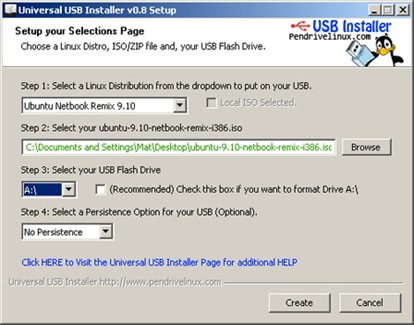
To install Ubuntu 10.10 on a netbook you need to download a tool called USB Universal Installer you can copy the contents of several distribution turning it into a USB bootable to be able to install from there.

The USB Universal Installer not necessary to install, you just have to run it, and accept the license agreement and you will see a window similar to that seen in the picture below.

Installing Ubuntu 10.10 on a netbook with a flash drive

In the picture you can see there are 4 Steps, the first must select the version of Linux you want to install, Jan T his case should be selected Ubuntu Desktop 10.10, Should not have downloaded the iso can tick the Download the Iso that appears to not specify a Iso image locally.

The third step is to select the flash drive in the unit who want to copy the files, for that reason it is preferred to put a flash drive before starting the application, and this is detected without problems, I recommend you also check that the drive letter that corresponds to pendrive just put, it is recommended Tembien FORMAT pendrive.

Step 4 asks if we want to do persistent, ie that can store information on your flash drive to use as a live cd, it depends on your needs

Read more...