Showing posts with label Facebook. Show all posts

How to hide my Facebook picture

Facebook allows users to upload images to photo albums. By default, your Facebook friends can see all the images you upload and search through your albums. You hide images changing the privacy settings of the album in which they are. Your Facebook photo albums may be private (only you), hidden from all but specific friends or hidden to specific individuals. Each image uses the privacy settings of the album that is, the images do not have their own privacy settings.

Steps to hide my Facebook picture

Step 1. Open your Facebook profile page on facebook.com and click on the link "Photos" on the left of the page.

Step 2. Click the album containing the image you want to hide.

Step 3. Click the link "Edit Album" above the picture album.

Step 4. Click the box to the right of "Privacy" and click on"Customize"

Step 5. Click the box below it "Make This Visible To" and click "Only Me"

Step 6. Finally, click on the button Save Settings

Read more...

Facebook Desktop: see Facebook notifications on your desktop

For those wishing to keep abreast of Latest reports their friends and family have Share on Facebook.

I strongly recommend a cool Adobe Air application called Facebook Desktop.

Facebook Desktop, Is an application which allows users of Windows, Linux and Mac on your desktop Receive a series of bubbles. Which are shown in the most recent comments. That have been shared Facebook other users (friends and family).

facebook-desktop

In other to have the application open. The user will no longer be in need open your Facebook account to learn about what is happening in this popular network.

Trial | Facebook Desktop.

Read more...

How to use an encrypted connection to surf Facebook

Facebook is the most visited site in the world, but lacked the technology that will secure the safety of its visitors to navigate. The novelty is that now provides an encrypted connection system.

However, to use the secure connection option, you need to activate and thus, today we will teach you how to do it step by step:

The first is go to Facebook and go to Account In the upper right side of the screen. There will also display a list and must click on Account Settings. Now, you get to go down to where it says Account Security and click on the link that says Change.

Once there, check the box that says Enable HTTPS. Ready, now adds the option of browsing encrypted on your Facebook. If you do not see this feature do not worry, as it will add gradually to all profiles.

Read more...

Removes all traces of your browser to Facebook

If you are someone who you do not like Facebook and navigation in various web pages asking you to login to the Facebook account to comment on a post or somewhere on the page you can take several widgets that encourage you to share content ...

I present Facebook Blocker, An extension for Firefox, Chrome and Safari which enables you block all traces of Facebook on any web page, such as buttons of "Like" or "Like" to become a fan widgets, or buttons to share.

It is special for those people who do not like Facebook and do not want to see traces of that network on the web.

Link: Facebook Blocker

Read more...

Facebook for Chrome: manage your Facebook from Google Chrome

After Google gave the nod to the extensions, was a matter of time for which the users themselves develop their own applications, so that today we find all sorts of functions. These include Facebook for Chrome an extension, as its name implies, seeks to allow the user to manage your Facebook account in a different way.

With Facebook for Chrome and no need to open the Facebook page to see our notices or messages, nor for advertising, but everything is done from an integrated to the browser and, incredibly, no bother at all as we sail by other sites.

Besides, Facebook for Chrome also allows other activities "daily", such as search, add user profiles to favorite or comment directly from the application. Interesting, huh?.

Link: Facebook for Chrome

Read more...

Tips to be popular on Facebook

Following in the tone of this monster called Internet Facebook I came across an interesting study that identifies some factors that positively influence each user, can help increasing popularity among friends and contacts. These tips, get rid of an interesting study using information from some users in the United States.

For example, it was determined that to be more popular You only have to write messages bigger status update, talk about music and / or sports besides you should not be very emotional. Nor should we talk about family, not to mention a time frame (eg I will do this morning, yesterday it was the other, etc..) And above, use the word "you" in large quantities. That is what makes a user more popular, according to the study.

facebook-data

This analysis was done with an application called Linguistic Inquiry and Word Count (LIWC) Who took a sample of 1,000,000 profile updates made by English-speaking users who reside in the United States. All data were rendered anonymous and have been classified into 68 categories for its study.

In addition to these tips to be popular, relevant information was obtained, for example, the number of positive messages / optimists have a peak in the morning (Between 6:00 and 8:00 am) and the negative messages or represent frustration, increase in hours of the night, peaking between 12:00 and 02:00 am.

Read more...

Official Facebook application for Windows Phone 7 Updated

The Facebook application for official Windows Phone 7 has been updated Microsoft in yesterday, reaching its Version 1.1. It adds two features that have been the highlights of the network in recent times, as is the case Facebook facial recognition and Places.

With the first characteristic can upload images and tag them with the names of our contacts, all from the mobile. One feature that arrives almost to the web version of Facebook and that eventually we will get suggestions on automatically when people want to tag a photo.

Facebook sites, meanwhile, allows us to check in at various places to show, through the network, our activities and our location on the maps. This feature will be highly valued by companies that already offer rewards and discounts to those engaged in check in its stores.

Read more...

Facebook Hacker Cup 2011

Facebook has just announced Facebook Hacker Cup 2011 which is a annual programming contest open to hackers algorithms worldwide that is online but with a final part of the top 25 at the headquarters of Facebook in Califormia with all payments and awards of up to $ s5.000

2011-hacker-cup

When? Registrations are open Dec. 20 and three rounds were made in January 2011. The official site is this you can register yourself and then on when registration opens ... do not forget that the first Google Code Jam winners were all over the world:)

Read more...

World map of social networks: Facebook is the undisputed leader

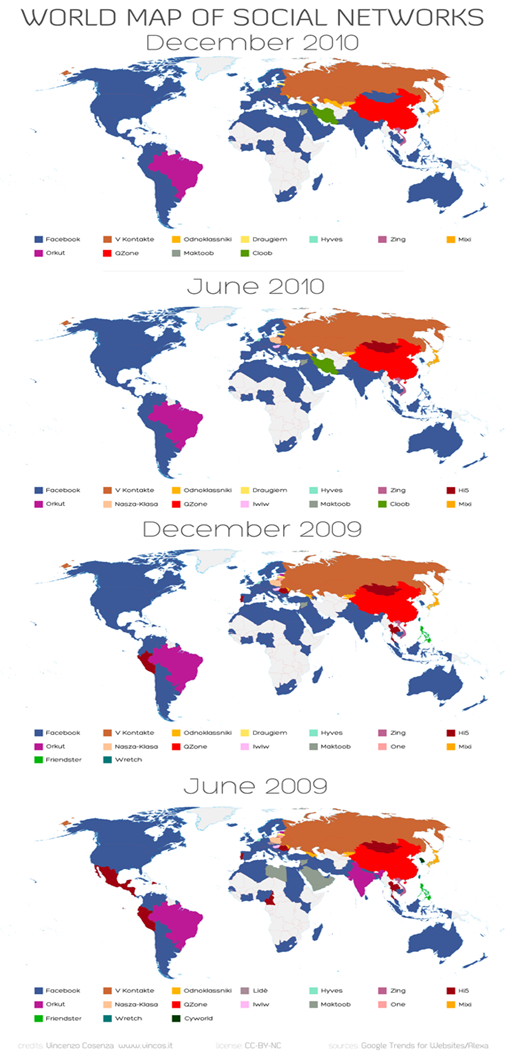
Vincenzo Cosenza maps are a good way to learn the expansion of the different social networks in the world. A few months ago and used one at Engadget to represent Facebook domain But yesterday released an update of it and the picture is even more evident.

Why? For if in June this year we could say Facebook was a leader in what social networking is concerned, today it is even more: through analysis of data from Alexa and Google Trends has come to the conclusion that Facebook is the main network 115, from 135 countries.

WMSN1210-Poster-570

As you can see in the picture are three main countries that still endure the pressure of the social network created by Mark Zuckerberg (China, Russia and Brazil), but who knows whether the respective indigenous initiatives will be able to survive in office much time.

As for the other networks are concerned, Vincenzo highlights an aspect I guess many of you'll be experiencing: the rapid rise of Twitter and LinkedIn. To the extent that lie like Facebook's nearest rival in a number of countries around the world.

Link

Read more...

There is a PlayBoy game on Facebook

Yes, when you think nothing can reach the limit, is Facebook.

It turns out that the popular social network is circulating (and becoming very popular) a Playboy game in which the mission is quite obvious, and the graphic say ... well ... striking.

The game is called PlayBoy Party, and the player's mission will be to hold a party in which guests receive certain and may well raise money to decorate the stage and expand facilities.

playboyparty

Besides that, the game features a system awards for players, Which consisted in showing the different covers and posters that characterized the magazine over the years, something like a small marketing campaign within Facebook.

Personally, I must say that I do not think bad or misplaced this kind of games that appear on the network, and while they may be linked to somewhat controversial topics are developed safely, and carefully. Yes, I do not like the network is filled with games of this kind since, surely, have a very important success And we all know it should be.

Link: Playboy Party - Facebook

Read more...

Now we can use Facebook profile on MySpace and share everything

The two big social networking the internet age (MySpace and Facebook) Joined by a partnership that benefits more than anything MySpace. When the Network began to flip between the company, MySpace became the most visited social platform.

Over time and under poor management, the platform was falling to the point of generating only loss, which has led its directors to opt for an alliance with Facebook, having to surrender to his solitary career and depend on network Zuckerberg .

Now, we enter MySpace with a profile or Facebook account. Facebook This initiative will provide even more services to its users, not to mention the push they mean for MySpace, now we can share with a simple Like me'''', Artists or friends of the network.  No doubt Facebook Today is the goose that lays golden eggs.
Read more...

Facebook and MySpace prepare an event for today

Facebook not to launch new products and give press conferences the past few months. A few days ago it announced its service email. Shortly before officers launched Facebook applications for mobile and iPhone, Facebook Places ... We could be up to the beginning.

myspace-facebook

However, this time we could see something new. And is that today will be an event which will be announced partnership between Facebook and MySpace, The leading music platform dying for some time and that could be saved thanks to this relationship with the network''gold.''

At the invitation launched by Facebook says nothing specific about the event. Only you can see that this announcement will be presented by CEO MySpace and Vice President of Facebook, today at 12:00 am.

Speculation leads us to many things, but I think it makes sense to think about integration of Facebook Connect on MySpace An option that would help a lot to the distribution and impact of MySpace worldwide.

Read more...

How to get your address email@facebook.com

Facebook now we will offer an email service for all users on your network, but initially not available to all users, it will first be available only for some, so if you want to be the first to try the service and get your email address tu.nombre @ facebook.com You must request an invitation.

  1. First you need to request an invitation to try the service at this address: http://www.facebook.com/about/messages/
  2. Once you receive your invitation to try Facebook Messages you should ask your address @ Facebook.com for this is to view messages http://www.facebook.com/?sk=inbox
  3. There you will see a link for your email address, your address will be the same you use in your Facebook username For example if your username is facebook.com /carlosleopoldo Your email address will be carlosleopoldo@ Facebook.com

With this new email service can check your messages Facebook, chat and SMS in the same place, controlling who you can send messages with your privacy settings, all messages exchanged with each friend you are a single conversation, does not need the subject field or other formalities, you can easily give extensive discussions no longer interest you. We do not offer anything revolutionary Gmail or other services consolidated.

Read more...

How to prevent other people label you in their Facebook photos

One of the things that annoy me Facebook is that someone labeled me in photos where they appear and do so only in order to advertise something or send me messages, images, and worst of all is that labeling the pictures where salts appear on your profile and often are treated photo embarrassing or irrelevant. If it bothers you too, here I'll show how to prevent Facebook users to see those pictures on your profile or video where you've been tagged The truth is that it is something very simple that I had not thought of doing until I saw LifeRocks how.

In fact Facebook not have an option to prevent others will tag their photos and videos but the best way to prevent others from seeing in which you have tagged photos is to make these photos visible to other users, here are the steps:

  1. You go to security settings Account -> Privacy Settings
  2. Once you enter the privacy settings on the left side choose Custom, and then click below to customize settings.
  3. Now under "Things that others share"There is an option that says"Photos and videos I'm tagging", Then choose the option to customize.
  4. You'll leave a picture with the customization option, then on the "The following people"Choose: Only me.

    To end you save the settings and from now on labeling the pictures where sales do not appear in your profile.

Read more...

Change background image : Facebook Login

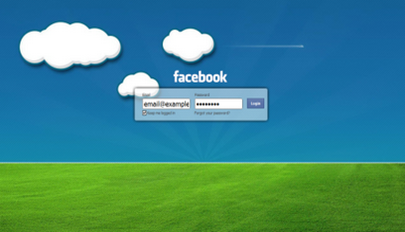
A good impression was that for me, an extension Google Chrome. Refresh Facebook replaced page login facebook an image (whatever we want), all it does is slightly alter the design without misuse of your data. Just install it you will see something like this:

Change background image Facebook - Login

To insert the image you want:

  1. Install Refresh Facebook
  2. Go to page extensions chrome: / / extensions /
  3. Click on the extension options Facebook Refresh
  4. Enter the URL of the image, select whether you want to repeat vertically or horizontally

Link | Refresh Facebook

Read more...

Facebook Inserting Albums, Events, Notes, and other objects in your WordPress blog

To date, there has been no easier way to integrate objects from Facebook in your blog, for example, albums, events, groups, notes, photos or videos, this in a blog that uses WordPress, and is that being a social network as popular, it is surprising to see the lack of a plugin that does this easily, but afurtunadamente already exists and is called Facebook Embed.

What makes this impressive is the fact plugin that allows you to embed objects from Facebook, but the way it works. After installing the plugin, there is no additional configuration you must do. Just paste the link to any article of Facebook in the content of a post (album, event, group, notes, photo or video) and all the plugin takes care of properly embedded object from Facebook

The only requirement to be able to share things about Facebook is that the object must be public on Facebook.

To use Facebook Embed need to have a blog hosted WordPress.org created with your own hosting and install the extension from the administration area.

Read more...

Facebook updates its version of IOS with new privacy options

While everyone is waiting for the much-vaunted Facebook's webmail In the network have also had time to update your version iOS, Which leads to more prominent new arrival of better parameters Privacy and Security.

Thanks to a renovation in its interface, you can now access these settings directly from the application without having to do it from Safari. Simply click on the button "Account" (the update is available in Spanish) at the top left, after which we will see a small menu from which we exit the application, set up our own, our privacy and direct the help desk.

Finally, it also fixes a bug that occurred when uploading images, and randomly prevented its publication in some albums.

Facebook for iOS 3.3.2 is compatible with iPhone, iPad and iPod Touch, occupies 4 MB of space and requires iOS 3.0 or higher for installation.

Download Facebook for iOS 3.3.2

Read more...

Facebook: Email Facebook

Facebook Monday will present a conference where the Titan project. No one knows for certain what will be shown in it, but analysts and sources close to a client talk email Facebook own, which makes sense when you consider that the relationship between social network users is higher than in any other digital communication system.
Apparently, the idea of receiving a email external notifications of friends, family, colleagues, etc. then having to entering the Facebook page, Could become a thing of the past by introducing a proper email the company, which has become a kind of @ Facebook.com.
The network has more than 500 million users. The actions it run by the users are uploading photos, commenting on others, but take the throne as the relationship between users, so that Zuckerberg and his team of social engineers could have prepared an e-mail client Facebook, with the aim of bridging to any other platform like Yahoo Messenger, Gmail and others.
Confirmed the news to see if the missing email Facebook work within a web application or through a desktop application. Whatever it is, on Monday we will know the new network's strategy to capture all Internet users in the world.

Read more...

Upload many photos at once to your Facebook - Apps

Easy Photo Uploader Facebook is a Windows application that does several things in one application, one is automatically resize the photos and the other is to upload photos to any existing photo album on your Facebook or a new album in Facebook with this application You can save time when sending photos without having to be online on the website Facebook.

Directly from the windows of the Windows file explorer, Easy Photo Uploader integrates into the right click menu so you just select the pictures, you click the right mouse button and select the option "Send your photo (s) to Facebook"

facebook foto uploader

Easy Photo Uploader Codec used WIC for photos, so you can directly upload your photo files in RAW (CR2 formats, NEF, MRW, etc..) that will become automatically JPEG photos to give you the highest quality (you can change this in the configuration of the application.)

Easy Photo Uploader is free and is designed for Windows XP / Vista / 7, 32-bit and 64-bit edition

link

Read more...

Facebook Application 3.0 Beta for Windows Mobile XDA

Sopis , joe_coolish and community Fredz xda - develoeprs are developing a Facebook client for Windows Mobile, and they do not feel very happy with the official version.

The Cambyses in this BETA 3.0 include :

  1. Post comments
  2. Update status ( your status by clicking on the tab "Profile ")
  3. Alert new version available (So you do not have to come to emovilPRO to know if a new beta out  )
  4. Update posts, walls and comments every time you see them
  5. improved human interface
  6. Speed

To download , visit their forum XDA Developers

Read more...