LG GS290 Cookie Fresh

LG GS290 Cookie Fresh

LG GS290 Cookie Fresh is a colorful and styled mobile phone that comes which provides effective functionality. The unit measures 108 mm x 52 mm wide and is 12 mm thick whilst weighing only 89 g in weight.

The device comes with a 3.0 inch TFT touch screen that displays 256,000 colors within a 240 x 400 pixel screen size. A gesture shortcut, handwriting recognition, and accelerometer sensor are also included. LG GS290 Cookie Fresh provides a phone book that will retain up to 1000 entries and also includes photo call. A stereo FM radio with RDS is provided which comes with a built in antenna as well as a variety of games, with the option of downloading further games. The integrated MP4/MP3 media plan provides the means to listen to a wide array of media formats.
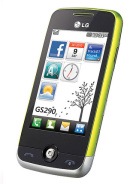
lg-gs290-cookie-fresh

The handset comes with both ring and vibration alert options with the opportunity to utilize downloaded music files as MP3 ringtones. Hands free communication is provided by virtue of the speakerphone whilst a 3.5 mm audio jack provides the means to plug in a headset. MicroSD card slot is available which allows user to increase the available memory storage up to 16 GB.

LGGS290 Cookie Fresh provides effective connectivity by virtue of its inclusion of a variety of options which include class 12 versions of GPRS and EDGE with the added benefit of having USB and blue tooth connections. The handset offers social network integration, with the inclusion of its Facebook native client.
http://www.getele.com/lg/lg-gs290-cookie-fresh.html

Read more...

How To clear Cookies and Caches On Samsung Captivate’s Web Browser

As we all know, most of mobile phones nowadays have been supported with Web Browser. With it, we can browse the internet anywhere anytime. Sometimes, we also need to have browser privacy settings too. At this matter, setting privacy on Samsung Captivate phone by clearing cookies and caches.

First, tap Browser on the Home Screen and the Menu Key. Choose More and tap Settings, then scroll until you find Clear All Cookie Data, tap it and tap OK. Do the same steps if you want to clear Cache. Don’t forget to tap OK, now your phone’s web browser has the privacy setting already.

Read more...

Manage Internet Explorer Error Reporting

This tweak removes the IE Error Reporting tool from appearing with the option to send browser debugging reports to Microsoft.

Start Run Regedit

Go to: HKEY_LOCAL_MACHINESoftwareMicrosoftInternet ExplorerMain

Note:- Create both values listed below and set according to the bold type for the tweak to function properly.

Modify/Create DWORD Value of Data type REG_DWORD Named IEWatsonEnabled
Value Data: 0 - Disabled / 1 - Enabled

Modify/Create DWORD Value of Data type REG_DWORD Named IEWatsonDisabled
Value Data: 0 - Disabled / 1 - Enabled

Exit Registry / Reboot
more:here
Read more...

Customize Logon and Security Dialog Title

Start Run Regedit

Go to: HKEY_LOCAL_MACHINESOFTWAREMicrosoftWindows NT CurrentVersionWinlogon

Modify/Create String Value of Data type REG_SZ Named Welcome
Value Data: 0 = Disabled / 1 = Enabled

Exit Registry / Reboot

17. Customize Logon Box Message

This is the message displayed on the Classic Logon box, not the XP ?Welcome? logon screen

Start Run Regedit

Go to: HKEY_LOCAL_MACHINESOFTWAREMicrosoftWindows NT CurrentVersionWinlogon

Modify/Create String Value of Data type REG_SZ Named LogonPrompt
Value Data: Enter the text of the message

Exit Registry / Reboot
source:here
Read more...

Welcome Screen Logon Vs Classic Logon

This tweak specifies whether the Welcome screen or the Classic logon will be used to access Windows XP.

Start Run Regedit

Go to: HKEY_LOCAL_MACHINESOFTWAREMicrosoftWindows NTCurrentVersionWinlogon

Modify/Create DWORD Value of Data type REG_DWORD Named LogonType
Value Data: 0 - Classic Mode / 1 - Welcome Screen

Exit Registry / Reboot
more:here
Read more...

QoS (Quality Of Service) Bandwidth Reserve Setting

Windows XP reserves 20% of the connection bandwidth for QoS traffic. This tweak allows the setting to be altered to a different percentage of connection bandwidth. If the system uses more than a single adapter for network connections, each adapter may be set individually by navigating to:

HKEY_LOCAL_MACHINESYSTEMCurrentControlSetServicesPschedParametersAdaptersAdpater-ID rather than HKEY_LOCAL_MACHINESOFTWAREPoliciesMicrosoftWindowsPsched

Start Run Regedit

Go to: HKEY_LOCAL_MACHINESOFTWAREPoliciesMicrosoftWindowsPsched

Modify/Create DWORD Value of Data type REG_DWORD Named NonBestEffortLimit
Setting for Value Data: Enter as a Percentage / Default Value = 20

Exit Registry / Reboot
source:here
Read more...

Enable/Disable Save Password in DUN

This tweak saves user passwords for Dial Up Networking so they do not have to be re-entered each session.

Start Run Regedit

Go to: HKEY_LOCAL_MACHINESYSTEMCurrentControlSetServicesRasManParameters

Modify/Create DWORD Value of Data type REG_DWORD Named DisableSavePassword
Setting for Value Data: 0 = Disabled (Passwords Saved) / 1 = Enabled (Passwords Not Saved)

Exit Registry / Reboot
more:here
Read more...